
猜测大多数人应该遇到过这样的情况,在登录网站发表/编辑文章时,辛辛苦苦写了几千字的内容,心血啊,结果因为停电、电脑死机、浏览器崩溃、网络异常,导致辛苦写了半个小时或更长时间的内容瞬间丢失了,这个时候飘易估计你连骂爹的话都在心里重复了N遍。
我们来看下这位网友遇到的数据意外丢失的问题:我早晨在sina博客,通过chrome发布了撰写一篇文章,我在登陆sina博客以后点击“发博文”的按钮以后,直接撰写我的博文。但是这一篇文章并没有发布出去,现在既没有发布出去,也没有在sina博客上留下任何记录。因为这一篇文章真的对于我来说很重要,我想我没有办法再可以同样再写出一篇相同的了,记录了我很多事情。所以我想请教技术高手,我是否可以通过chrome内的记录来找回,有没有这个可能?
给这位网友的回复就是没有可能找回了,只能手工再次重写这篇文章。遇到这种情况,您是不是非常痛苦? 在写重要文件前,最好本地word编写,并将word开启保存修改记录功能。另外,我们写gmail邮件就会有自动保存草稿,google Doc也会定时保存。我个人有时候在WP写文章,也有自动保存为草稿,个人认为这个功能还是挺好的。 “保存到草稿箱”不就是怕在写较长的文章写到中途的时候发生意外,例如停电、电脑死机、浏览器崩溃等!这些情况虽然很少发生,但发生后的确令人很痛苦(我就经历过)。因此这个功能很有用,突发情况不多,但往往是致命的。
为此,慧特利“见赏·极速建站”上线了草稿保存功能。自动每隔10秒将编辑区内容保存在本地。
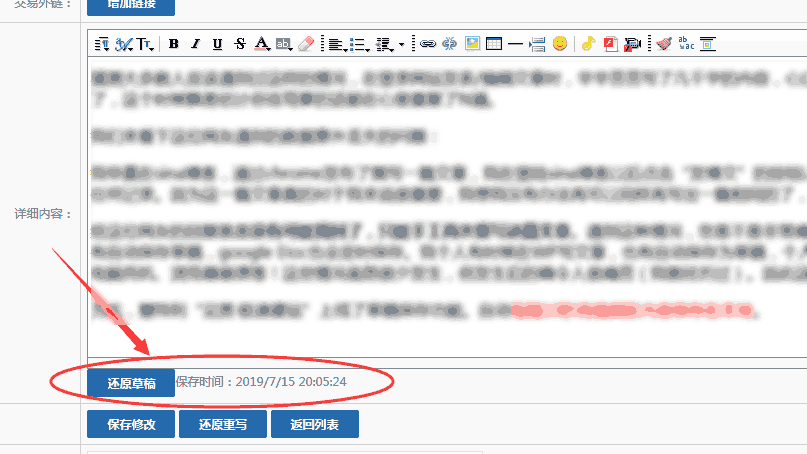
今日,草稿保存功能已从文章编辑扩展到通栏主页及多语种的编辑页,欢迎使用
Huiteli “JIANSHANG Fast Web Building” is a lightweight online website construction platform.
The platform was conceived and launched from 2011. After a long-term version change, it was officially commercialized in 2016.
Keeping pace with the times, it has achieved mainstream functions such as template switching, multilingual, automatic translation, and compatible mobile APP.
Adopt a simpler form-based way of building a website - users only need to fill in the blanks to complete the construction and release of the website.
Advocate data-driven business, built-in mall system, membership system, distribution system, member submission, anonymous comments and other rich functional modules.
The platform combines the concept of PAAS on the basis of SAAS, allowing customers to select value-added services provided by third parties through the platform without worrying about technical issues such as system compatibility.
The platform was conceived and launched from 2011. After a long-term version change, it was officially commercialized in 2016.
Keeping pace with the times, it has achieved mainstream functions such as template switching, multilingual, automatic translation, and compatible mobile APP.
Adopt a simpler form-based way of building a website - users only need to fill in the blanks to complete the construction and release of the website.
Advocate data-driven business, built-in mall system, membership system, distribution system, member submission, anonymous comments and other rich functional modules.
The platform combines the concept of PAAS on the basis of SAAS, allowing customers to select value-added services provided by third parties through the platform without worrying about technical issues such as system compatibility.